

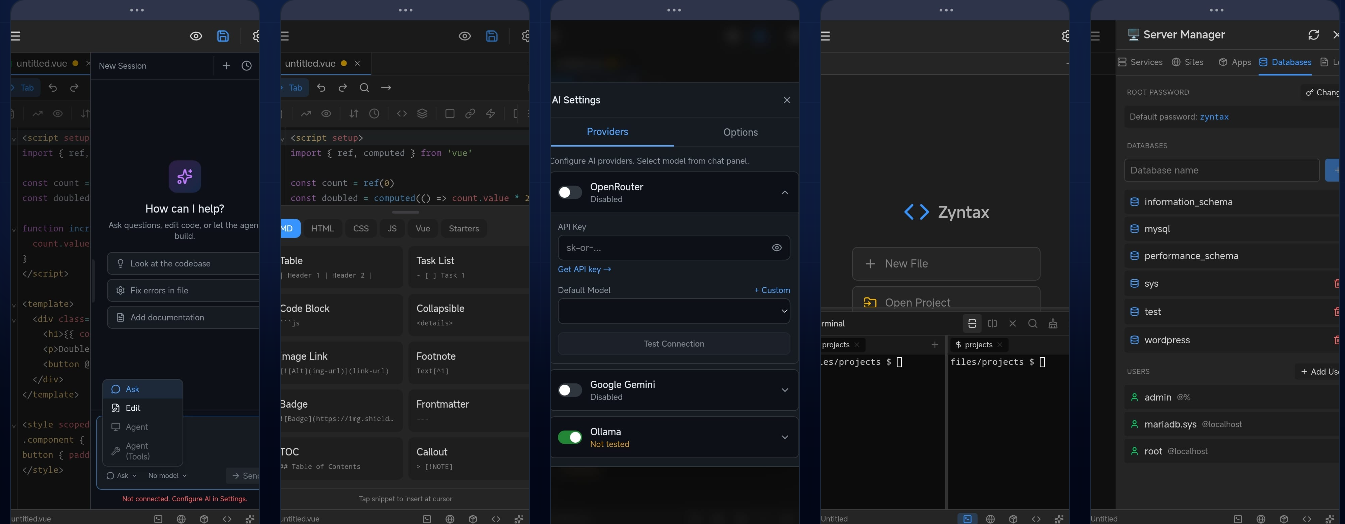
Powerful smartphones have become more capable than many laptops from just a few years ago. Yet most developers still reach for a computer when it's time to write, debug, or ship code. Zyntax changes that.
Available at https://zyntax.app/, Zyntax is a professional-grade code editor built specifically for Android devices. It packs a real terminal, Git integration, AI assistance, and even a package manager — all without needing a PC, laptop, or cloud IDE subscription. Whether you're commuting, traveling, waiting in line, or simply prefer the portability of your phone or tablet, Zyntax lets you code anywhere and build anything.
Why Mobile Coding Matters More Than Ever
The line between "mobile device" and "development workstation" has blurred. Modern Android phones feature:
- Multi-core processors faster than many mid-range laptops
- 12–16 GB RAM configurations
- High-resolution displays with 120 Hz+ refresh rates
- External keyboard + mouse support via Bluetooth or USB-C
Yet until recently, the software ecosystem lagged behind the hardware. Text editors existed, but serious development work — cloning repositories, running npm/yarn/pip, pushing to GitHub, debugging with a real shell — remained painful or impossible.
Zyntax bridges that gap.
Core Features That Make Zyntax Stand Out
1. Professional Code Editor
Syntax highlighting for over 10 popular languages (JavaScript/TypeScript, Python, Java, Kotlin, Go, Rust, HTML/CSS, and more).
- Smart autocomplete
- Multiple cursors
- Find & replace (with regex support)
- Vim-style keyboard shortcuts
- Clean, distraction-free interface optimized for touch + external keyboard workflows
2. Real Terminal (Bash)
This isn't a simulated or limited shell. Zyntax includes a full-featured terminal so you can:
- Run npm install, pip install, cargo build, or gradle build
- Execute scripts and build tools directly
- Use familiar commands like ls, grep, git, curl, etc.
3. Built-in Git Integration
No need to switch apps or copy-paste tokens:
- Clone, commit, push, pull, branch, merge
- View diff, blame, log
- Stage/unstage files visually or from terminal
4. AI Assistant
Integrated AI helps with:
- Code generation and completion
- Explaining complex code
- Debugging suggestions
- Refactoring ideas
- Writing tests or documentation
All of this runs locally or via efficient cloud calls — no need to leave the editor.
5. Package Manager & Build Tools
Install dependencies, run dev servers, and even build & preview web apps or command-line tools directly on-device.
Who Is Zyntax For?
- Students & learners — Practice coding on the bus or between classes without carrying a laptop
- Indie developers & side-hustlers — Quickly fix bugs, merge PRs, or prototype features while away from desk
- DevOps & backend engineers — Manage servers via SSH, edit configs, run deployments from anywhere
- Open-source contributors — Review code, make small fixes, and push changes during travel
- Anyone who values mobility — The freedom to open a repo and be productive in 10 seconds
Pricing & Plans (as of early 2026)
Zyntax offers a generous free tier that includes the core editor, syntax highlighting, terminal access, and basic Git features — enough for most everyday coding sessions.
Paid plans unlock:
- Advanced AI features
- Unlimited Git operations
- Priority support
- Additional language packs & themes
The team emphasizes a fair, developer-friendly pricing model without aggressive upselling.
Getting Started Is Simple
- Visit https://zyntax.app/
- Download from Google Play (or sideload if preferred)
- Open the app → sign in with GitHub/Google (optional for AI & cloud features)
- Clone a repo or create a new project
- Start coding — no lengthy setup required
The Bottom Line
Zyntax isn't trying to replace VS Code, JetBrains, or Neovim on a powerful desktop. What it does — brilliantly — is remove the "I need my computer" barrier for hundreds of common development tasks.
In a world where our phones are always with us, Zyntax makes them genuinely useful development companions.
If you've ever wished you could hotfix production code from a café, experiment with a new framework while traveling, or just keep momentum going without switching devices — download Zyntax today.
Code anywhere. Build anything.
https://zyntax.app/


